
Mechanic invoice software.
Job done to invoice sent in 60 seconds. The approved quote becomes the invoice.
- No contract
- No fee per user
- 30 days free
No card. Takes 1 minute. Walk away any time.
How it works
- Finish the job
Mark the job done on the job card.
- Check the invoice
It is already made from the approved quote. Same numbers.
- Get paid
The customer pays online or at your counter.
Paid before pickup
From the quote
The approved quote turns into the invoice. Nothing is typed twice.
GST shown
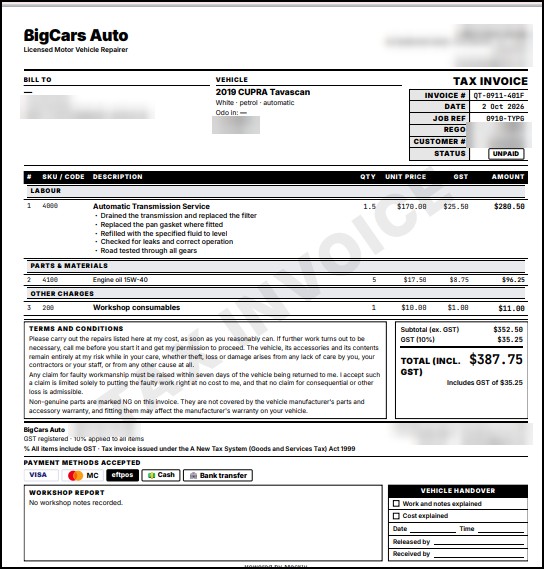
Every invoice shows the total, the amount ex GST and the GST.
Pay from their phone
Customers pay by card, Apple Pay or Google Pay through Stripe.
Keep your card machine
Cash, EFTPOS and your terminal work as they do today.
Your money, your bank
Online payments go to your own Stripe account, then your bank. Meckly never holds your money.
Nothing missed
Jobs not billed yet jump out at you on the invoices screen.
Sent to accounts
Send your invoices across to Xero, MYOB or QuickBooks.
BAS report
A quarterly sales and GST report, ready for your BAS. Have your accountant check it.
Before and after
| Job | The old way | With Meckly |
|---|---|---|
| Making the invoice | Typed from the job | Made from the quote |
| Chasing payment | I'll pay Friday | Paid before pickup |
| Jobs not billed | Found weeks later | Flagged on screen |
| Your accounts | Typed in by hand | Sent across for you |
Common questions
What does a Meckly tax invoice show?
Your business details and ABN, the work and parts, the total, the amount ex GST and the GST. Check the ATO tax invoice rules with your accountant.
How do customers pay?
Online by card, Apple Pay or Google Pay. Or at your counter with cash, EFTPOS or your card machine.
Does Meckly take a cut of my payments?
No. Your Meckly plan is billed on its own. Customer payments go to your Stripe account and then your bank. Stripe charges its own card fees.
When do I get the money?
Stripe pays out to your bank on a regular schedule. You can see when your next payout lands.
Does it work with Xero, MYOB or QuickBooks?
Yes. Every plan sends your invoices across to Xero, MYOB or QuickBooks.
More answers in the help centre.
Try it free
Use Meckly free for 30 days. If it isn't easier than what you use now, walk away. You owe nothing.
Start my free 30 days