Workshop Management Software vs a Fancy Calendar
A calendar tells you when a car is coming in. Real workshop management software tells you what the car is worth, whether the quote was approved, and whether Friday's invoice ever got paid. There's a difference.
In this guide · 4 min read
Every tool in your workshop has a job it's supposed to do and a job it's actually capable of doing. A ring spanner tightens a bolt. A torque wrench tightens it to a spec. Both are wrenches. Only one of them tells you when to stop.
Most of what gets sold as workshop management software is a ring spanner pretending to be a torque wrench. It schedules bookings. It generates an invoice. It calls itself management software. And a calendar with an invoice attached is not the same thing as a system that actually runs your workshop.
That's the distinction that costs independent Australian mechanics real money every week, not because they're doing anything wrong, but because the tool they're using isn't built to do what they think it is.
What does a basic booking or job management tool actually do?
Honestly, a fair bit. And that's part of what makes this confusing.
A solid booking or job management tool will handle your schedule, send a confirmation to the customer, let you log what was done, and spit out an invoice at the end. For a small shop doing straightforward work, that covers a lot of ground.
The platforms in this space worth knowing about include Mechanic Desk, Workshop Software, AutoMaster, and Qwaiting, which gets mentioned in Australian mechanic forums for combining customer management, scheduling, and invoicing. Each of them does something useful. None of them are frauds.
Where they start to show gaps is in what happens between the steps.
What falls through the gap when software only handles the schedule?
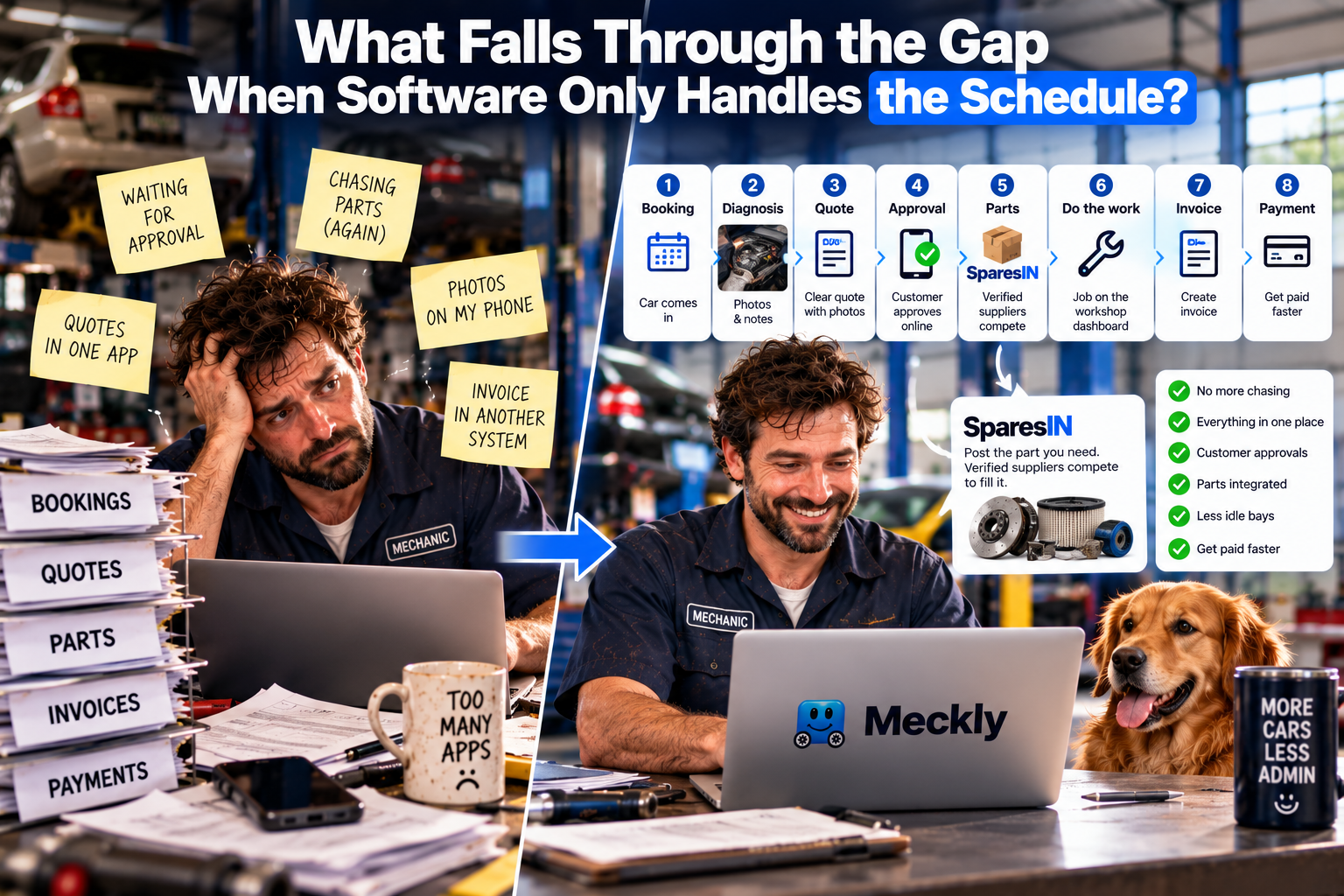
Think about the actual shape of a job.
- Car comes in.
- You diagnose it.
- You build a quote.
- The customer has to approve that quote before you touch anything.
- You need a part, so you source it.
- You do the work.
- You invoice.
- You get paid.
A booking app handles steps 1 and 7. Maybe 8 if you're lucky. Everything in between is either manual, done in a second app, or just in your head.
Step 4 is where bays go idle. The quote goes out by text or email, and then you wait. No visibility on whether it was opened. No nudge. Just a car taking up space while you're onto the next job, hoping someone rings back.
Step 5 is where time bleeds out silently. Six calls to find a part for one job is not unusual. Nobody invoices for that time. Nobody accounts for it. It just disappears.
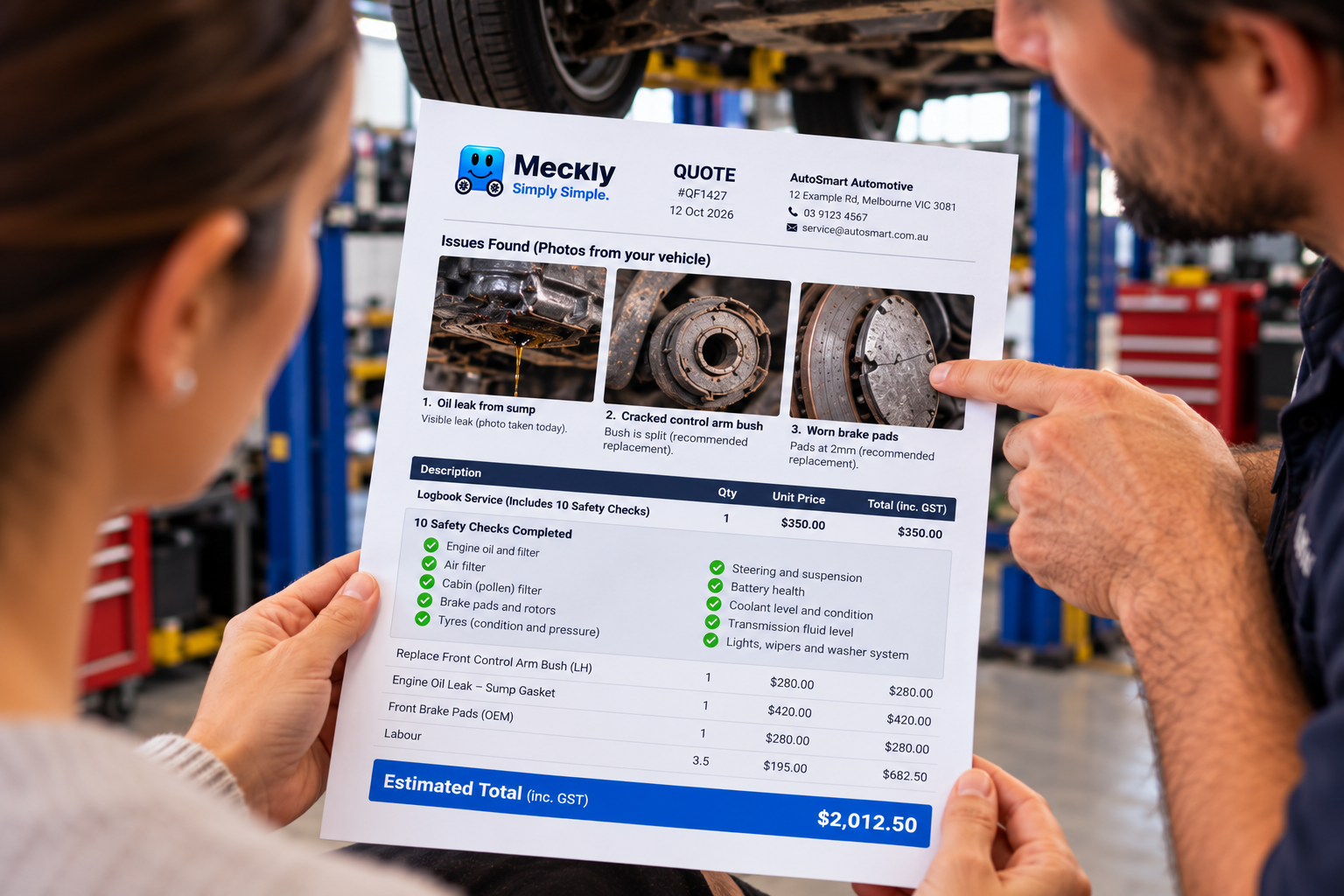
And when something goes wrong, when a customer disputes a charge or questions whether that work was necessary, steps 2 and 3 are where you need your evidence. If your diagnostic notes and photos are in your phone's camera roll while the quote is in one system and the invoice is in another, you're not holding a strong hand.
What real workshop management software connects together
The difference is whether the platform covers the whole job or just the bookings at either end of it.
Real workshop management software links the quote to the approval to the parts request to the invoice, in one flow, without you stitching it together manually. When a customer approves a quote digitally, the job moves forward. When it doesn't, the system flags it. When you need a part, you don't go back to the phone.
That last part is where SparesIN, the auto-parts marketplace, fits in. A workshop posts the part it needs and vetted local suppliers compete to fill it, integrated straight into a Meckly quote. Unlike most marketplaces it isn't open to anyone with a part to sell. Suppliers are verified shops, vouched for by real workshops. It's properly business-to-business, not a free-for-all. The result is that the part request and the quote live in the same place, and you're not on hold to find out if someone has the part in stock.
Digital Job Cards Cut Six Phone Calls to OneRead nextDigital Job Cards Cut Six Phone Calls to OneThe old way vs the real thing: a straight comparison
| What the job needs | Booking software or glorified calendar | Real workshop management software |
|---|---|---|
| Schedule and confirmation | Yes | Yes |
| Digital quote with line items | Sometimes | Yes |
| Customer approval tracked in the system | Rarely | Yes |
| Diagnostic photos attached to the quote | No, usually a separate app or camera roll | Yes, on the quote itself |
| Parts sourcing inside the platform | No | Yes, via SparesIN |
| Invoice connected to the original quote | Sometimes | Yes, one document trail |
| Payment tracking and follow-up | Rarely | Yes |
The verdict is straightforward. If your software doesn't cover the middle of that table, it is not managing your workshop. It is managing your diary.
Why the diagnostic photo is the detail most people miss
This is the one that doesn't get talked about enough.
When a customer gets a quote that says
Digital Job Cards Cut Six Phone Calls to One
 WorkshopsNew
Quote Approval Delays. What a Silent Bay Costs
 Workshop tipsNew
How to Explain a Repair Recommendation Customers Trust
the customer didn't distrust the price. They distrusted the explanation.
 Workshop tipsNew
Why Your Busiest Day Kills Workshop Productivity
your busiest day and your most profitable rarely match.